White Clothing: Keep the Details
White should remain white without becoming an empty shape. A visual reference and review guide for pale shirts, dresses, and textured fabrics.
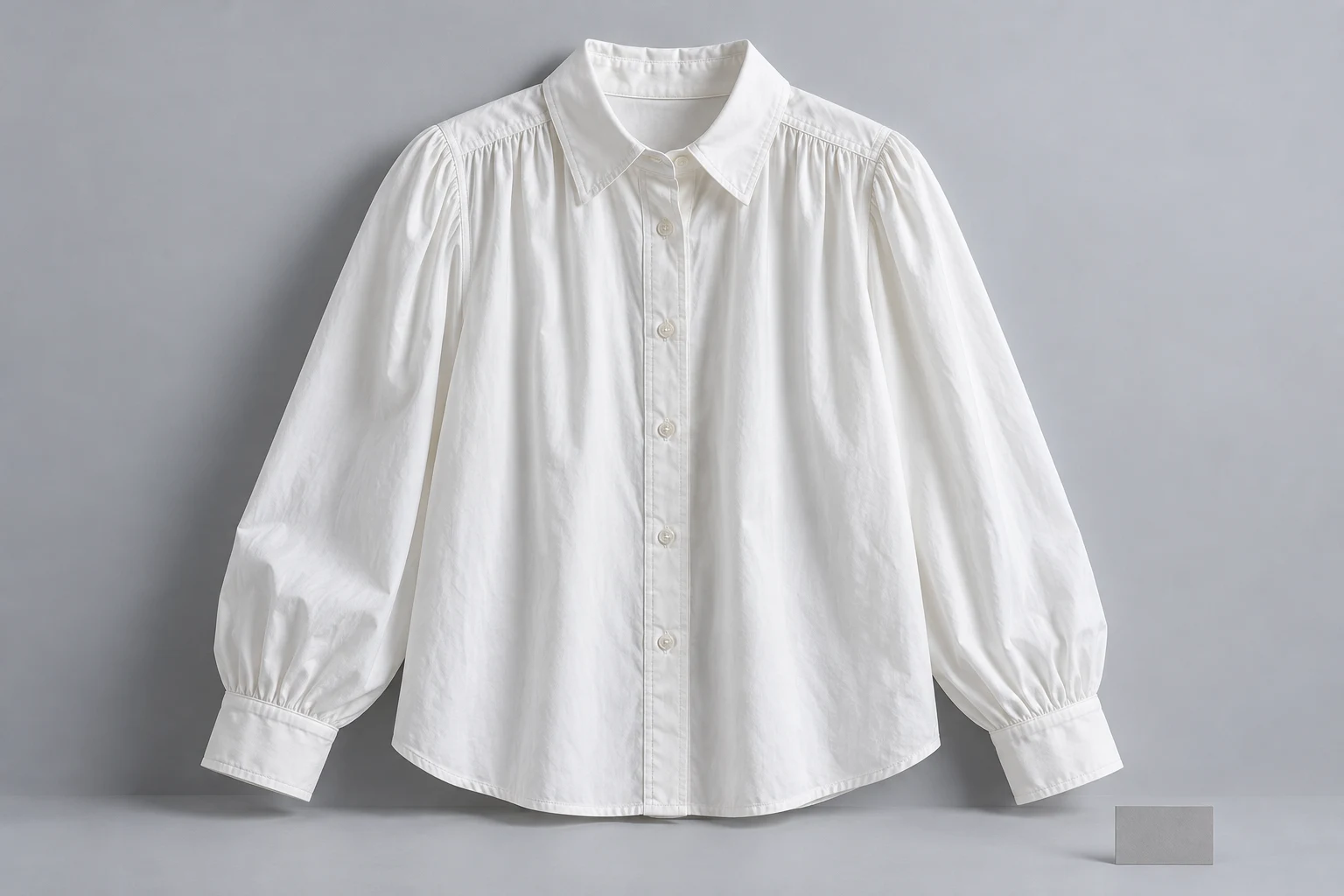
Protect the information inside the white garment, then check its boundary against the scene.
A white blouse needs more than a bright outline. The viewer should still be able to distinguish the placket, collar, cuffs, seams, and meaningful texture. Begin with a reference that shows those features together. If the fabric looks like one uninterrupted white patch, the source is not explaining enough of the garment.
Treat the body of the blouse and the background as separate review areas. A clean pale backdrop can suit the image while the cloth retains gentle tonal differences. Do not use the same demand for pure white everywhere in the frame; the shadows describing a seam are useful product information, not automatically a defect.
Inspect the Bright Areas
A bright preview and a detailed white garment are not the same thing.
Inside the fabric
Inside the fabric
Inspect seams and fold detail.
At the boundary
At the boundary
Follow the sleeve and cuff edge.
Nikon describes highlight clipping as the loss of detail in completely white areas. Use that principle while preparing references: inspect a cuff, shoulder, and chest fold for retained information. A histogram or highlight warning can help locate a concern, but the product area itself is where you decide whether an important feature has disappeared.
Brightness on a screen can be misleading, especially when the surrounding environment changes. Compare the original file under consistent viewing conditions instead of chasing a bright thumbnail. If a source has already lost a tiny seam or delicate weave, another brighter export does not establish what that missing detail should be.
Use the Histogram Wisely
A predominantly white subject naturally contains many bright tones.
- Useful white
- Seams and folds remain distinguishable.
- Missing information
- A featureless area hides construction.
- Subject matters
- Mostly white scenes contain bright tones.
- Inspect locally
- Check the product, not only the graph.
FUJIFILM explains that the expected histogram depends on the subject: a mostly white scene can be weighted toward the bright end. The useful question is whether important garment detail is preserved, not whether the overall graph looks centered. A dark button or gray background also changes the distribution without changing the white fabric itself.
Use the diagram as a decision guide rather than a camera recipe. Look at the blouse, identify the feature that must remain visible, and inspect that area. Exact exposure settings depend on the light, camera, and material. Keep the reference session consistent across a group of white products so comparisons remain practical.
Separate Pale Edges
The sleeve should be easy to follow from shoulder to cuff.
Tonal information in the cloth
Separation at the garment edge
Two inspection crops from one conceptual photograph, not a before/after test.
A very pale sleeve on a very pale background can become difficult to locate. In a reference session, try a background with enough tonal separation to reveal the actual edge. Keep the change in the surroundings, rather than drawing a dark outline around the fabric or sharpening a false halo into the product.
Inspect difficult boundaries at cuffs, collar points, underarms, and the hem. A believable background does not compensate for an erased sleeve edge. If hair, hands, or a pale prop covers the boundary, choose another view for product review. Save the more atmospheric composition for a use where that feature is not essential.
Keep Pale Shades Distinct
A tidy edit should not turn neighboring pale colorways into one generic white.
- Reference
- Retain a readable neutral view.
- Scene
- Choose visible edges and useful light.
- Compare
- Check cloth, trim, and lining.
- Decide
- Approve or name the lost detail.
Use the supplied colorway as the reference and keep its name with the file. An ivory blouse should not be made chalk white merely because the background is white. Compare the main cloth with its buttons, lace, or lining; a uniform brightening can erase the intended difference between those materials.
Adobe recommends a controlled environment and clear lighting for product photography. Use that discipline for the source session, then separate it from creative mood. A warm campaign scene can be intentional, but retain a neutral product image beside it so the team can judge whether the garment itself has drifted.
Choose a Readable Scene
Use the visible lighting direction as a starting decision, then inspect the cloth.
Choose a model
When the selected scene needs one.
Add your product
Use the clear garment reference.
Choose a ready scene
Start with visible pose, light, and framing.
Generate and inspect
Review the product before approving.
In Studiola Lookbook, choose a model when needed, add the white garment, and select a ready scene. Its pose, lighting, and framing are visible before generation. The basic flow needs no written prompt. Prefer a direction in which the collar, cuffs, and hem can be inspected instead of disappearing against a similar surface.
The prepared scene helps reduce setup decisions; the output still needs a product check. TRY ON is a lower-credit-cost option for more open-ended art direction, where pose and scene choices may require more iteration. For either route, record which region is too bright or poorly separated rather than requesting an unspecified darker image.
Approve the Garment Structure
Use a short white-garment check before handing the image over.
Construction
Collar, cuffs, placket, and hem remain readable.
Boundary
Visible edges separate naturally from the scene.
Colorway
White, ivory, or cream remains the intended variant.
Compare the reference and result at a useful crop. Can you still read the button placket? Do the cuffs have their original shape? Is the hem continuous where it is visible? Are the folds describing cloth rather than turning into broad blank patches? These are product questions, not preferences about a bright or moody look.
If the source is unclear, add a clearer photograph before judging a reconstructed detail. If the source is clear but the result loses the feature, revise the result or choose another image. Keep the original white-clothing reference in the final set so later edits can be assessed against the same product information.
Sources, method & questions
Published · By Studiola Editorial Team
Frequently asked questions
Should white clothing be pure RGB white?
Not throughout the garment. Tonal differences help describe seams, folds, and texture; an all-white patch may hide useful detail.
Does a right-weighted histogram always mean overexposure?
No. A predominantly white scene can naturally contain many bright pixels. Inspect important highlight details as well as the graph.
Should I add a dark outline to make edges visible?
Use a clearer reference or more suitable background separation. A drawn halo can misrepresent the actual edge.
How this guide was researched
Studiola editorial guide informed by the linked primary sources, accessed October 23, 2026. Practical reference and review recommendations are editorial guidance, not measured model performance. Photographs are AI-created illustrations; diagrams explain the process. No independent benchmark or accuracy guarantee is claimed.
Sources & further reading
- 01How to read a Histogram
Nikon Support · Primary source · Checked
- 02How to Read a Histogram
FUJIFILM · Primary source · Checked
- 03What is product photography and how do you do it?
Adobe · Primary source · Checked
Give the garment a clear starting point
Bring your own product to a ready Lookbook scene, then inspect the details before publishing.