Keep Clothing Colors True Across Scenes
A teal shirt can shift toward blue or green across scenes. Keep a neutral product anchor, understand the lighting change, and review the actual colorway before delivery.
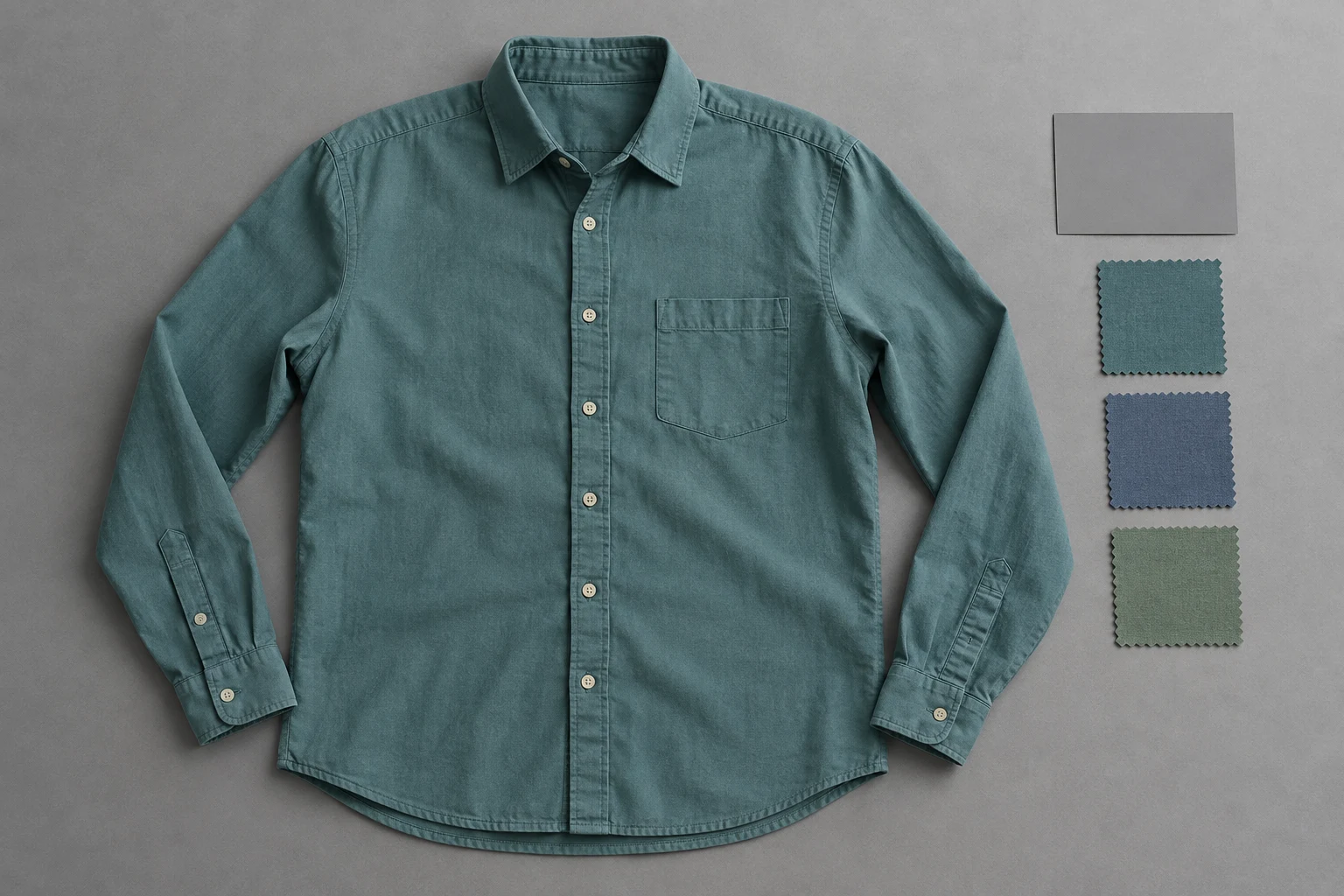
Anchor the colorway to a clear product reference, then review the effect of each scene.
Keep a straightforward, neutral-looking photograph of the actual item as the product anchor. Use its colorway name and source file consistently through production. A muted teal shirt should not become a different blue or green variant simply because a new scene looks attractive. The creative image and the product reference have related but different jobs.
The photograph in this guide is an illustration of reference organization, not a calibrated color measurement. In a real production brief, use the brand’s own product evidence. If exact color is critical, retain the physical sample and a controlled capture process rather than treating a generated patch or a screen screenshot as an objective standard.
Recognize the Light Color
A scene can influence how a fabric appears without defining a new colorway.
Product anchor
Product anchor
Keep the supplied colorway identifiable.
Viewing context
Viewing context
Inspect light and neighboring materials.
Sony explains white balance as compensation for the color of the light, which can make white objects appear yellowish or bluish in photographs. The principle matters beyond white clothing: inspect whether a scene-wide cast affects the environment as well as the shirt before deciding that the fabric itself has changed to another variant.
Keep the comparison useful. A shirt under warm indoor light and the same shirt in open shade will not produce identical-looking pixels. That does not make every difference acceptable. Return to the product anchor and ask whether the scene still communicates the intended item or now suggests another product in the range.
Prepare a Neutral Source
Do not let the first stylized photograph become the only color evidence.
- Product
- Which actual colorway is supplied?
- Capture
- Is the source neutral and readable?
- Scene
- Is the lighting mood intentional?
- Export
- Is delivery handling consistent?
Use a consistent capture setup for the product sources and retain an ungraded original. If you use a neutral reference card in the source session, keep the reference frame with the shoot records. The card helps explain that capture; a gray-looking object added to a generated scene does not certify the result’s color accuracy.
Adobe distinguishes white-balance adjustments from an intentional visual mood and notes that white balance affects the colors throughout an image. Apply that distinction to the brief: identify the product view used for color review and the separate scene used for atmosphere. This prevents a warm creative treatment from silently becoming the new definition of the garment.
Compare Colorway, Not Brightness
Look at material and lighting together when judging a candidate.
Useful garment color area
Supporting reference context
Two inspection crops from one conceptual photograph, not a before/after test.
Compare useful fabric areas that are not dominated by deep shadow, glare, or transparent overlap. Keep the same product revision and variant in view. A highlight on a curved sleeve and a flat region of the source are not equivalent samples; avoid declaring a color change from one arbitrary pixel in each image.
For the teal example, ask whether the shirt remains the intended muted teal or is now presented as a distinctly different variant. Inspect trim and neighboring fabric too. If the entire scene is warm, that is a different question from a shirt that alone changes color. Name the difference before choosing a correction or another result.
Keep Web Exports Consistent
The generated scene is only one part of the path to the viewer’s screen.
- Identify
- SKU and colorway name.
- Capture
- Retain a clear original source.
- Create
- Choose a visible lighting direction.
- Review
- Separate variant, scene, and export.
Adobe recommends sRGB for images prepared for broad online viewing and describes converting existing images to that profile. Keep a consistent export process for the product set rather than stripping or changing color information without a reason. This is a delivery practice; it does not repair a garment that already represents the wrong colorway.
Viewing devices and settings can still differ, so do not promise identical appearance on every screen. Keep your own review conditions stable and distinguish an export issue from a scene issue. If the source, working image, and delivered file disagree, resolve which file represents the intended product before making another creative version.
Choose the Lighting Direction
Make the scene’s mood a visible decision instead of an accidental color reference.
Choose a model
When the selected scene needs one.
Add your product
Use the clear garment reference.
Choose a ready scene
Start with visible pose, light, and framing.
Generate and inspect
Review the product before approving.
In Studiola Lookbook, choose a model when needed, add the product, and select a ready scene. Its pose, light, and framing show the starting direction, and the basic flow needs no written prompt. Choose a direction appropriate to the job: a product-led color view and a warm campaign scene may serve different purposes.
The visible direction helps reduce setup decisions, not guarantee color accuracy. TRY ON is a lower-credit-cost alternative for more open creative exploration, where scene and direction choices may need more iteration. Keep the same product anchor across attempts and record whether a requested revision targets the garment color, a scene-wide cast, or the export handling.
Approve a Traceable Colorway
Keep the original alongside the final creative file.
Variant
The intended SKU and colorway stay attached.
Scene
Creative mood is intentional and understood.
Delivery
The original source and export process remain traceable.
At handoff, retain the SKU, colorway name, neutral product source, approved creative view, and intended use. Check that neighboring variants have not been mixed. A campaign image can carry a deliberate lighting mood while a supporting product photograph makes the actual colorway clearer; the set should explain the item consistently rather than overwrite the source.
When uncertainty remains, add a clearer source or choose a more descriptive image instead of turning a subjective screen impression into a measurement claim. Record a concrete revision such as teal moved toward the blue variant or the whole scene has an unwanted warm cast. That gives the next decision a product basis without pretending every lighting difference is an error.
Sources, method & questions
Published · By Studiola Editorial Team
Frequently asked questions
Should fabric have identical RGB values in every scene?
No. Light, folds, and reflections change pixel values. Review the intended colorway against a clear source instead of requiring identical pixels.
Does a gray card inside an AI image prove accurate color?
No. A generated card is part of the illustration. Use a real controlled capture and actual product evidence when color accuracy matters.
Does sRGB guarantee the same color on every display?
No. It is a useful web-delivery choice, while screen capabilities and settings can still differ. It does not correct a wrong product color.
How this guide was researched
Studiola editorial guide informed by the linked primary sources, accessed October 23, 2026. Practical reference and review recommendations are editorial guidance, not measured model performance. Photographs are AI-created illustrations; diagrams explain the process. No independent benchmark or accuracy guarantee is claimed.
Sources & further reading
- 01White Balance
Sony · Primary source · Checked
- 02Adjusting white balance settings to improve photos
Adobe · Primary source · Checked
- 03Manage document colors for online viewing
Adobe Photoshop · Primary source · Checked
Give the garment a clear starting point
Bring your own product to a ready Lookbook scene, then inspect the details before publishing.