Black Clothing Needs Visible Texture
A black sweater can retain its outline while losing the material that makes it the product. Follow the surface, construction, and shadow information.
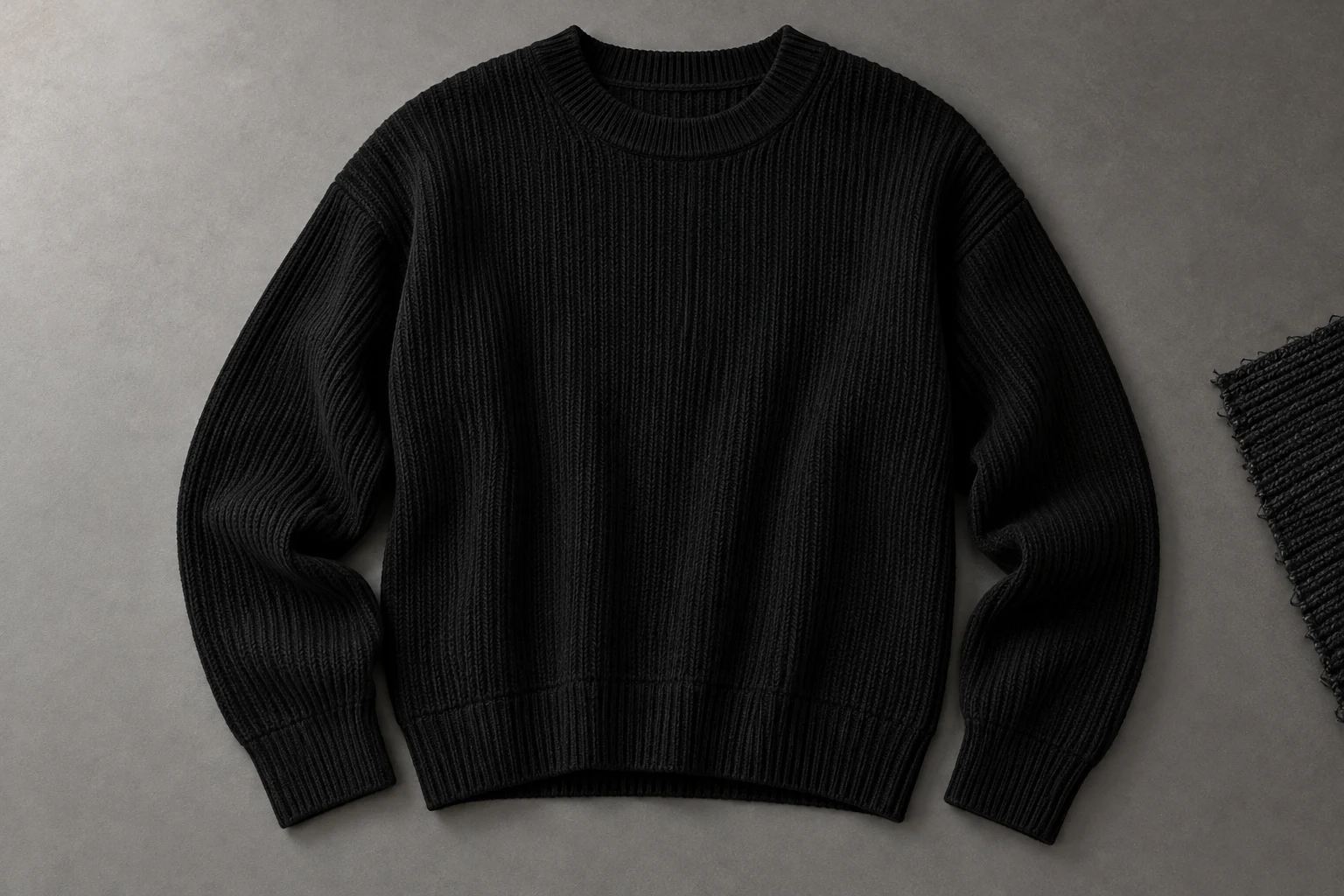
A dark garment needs readable material and construction inside its outline.
A black ribbed sweater and a black smooth sweatshirt can have similar outlines while representing very different products. If the result keeps the sleeves and neckline but replaces the ribbing with a flat dark surface, the silhouette alone is not a sufficient match. Start with a reference that makes those differences available to review.
Choose a small set of material landmarks before generating: neckline rib, vertical knit structure, cuff transition, and hem. The landmarks should come from the actual sweater, rather than from a generic idea of expensive knitwear. A believable textile effect can still be the wrong textile effect for the item being sold.
Read Detail in Shadows
Do not confuse a rich black tone with an unreadable surface.
Surface
Surface
Follow visible knit structure.
Construction
Construction
Inspect the cuff and hem transitions.
Nikon explains that shadow clipping involves detail lost in completely black regions. While preparing the source, inspect the ribbing and seam areas rather than only the overall brightness. A dark background may also create many dark pixels, so the graph alone cannot tell you whether the sweater’s important information has survived.
Use a closer view to locate the concern: is the knit there but subtle, or does the area no longer contain a readable pattern? Increasing the brightness of an already featureless area is not evidence of the original weave. Keep a clearer reference or recapture the region when material identity depends on it.
Use Directional Light
More light everywhere is not the only way to reveal a dark textile.
- Knit
- Direction and readable repeat.
- Join
- Neckline and sleeve construction.
- Finish
- Matte, smooth, or fuzzy surface.
- Edge
- Cuff and hem treatment.
Adobe’s texture-photography guidance discusses side lighting and diffused artificial light as ways to bring out surface detail. Use that as a source-capture principle: move the light or garment until the texture becomes readable without making the entire black sweater look gray. Review the effect on more than one area of the product.
The goal is a descriptive source, not the strongest possible contrast. One angle may emphasize a rib while hiding the neighboring seam. Keep a general view alongside a detail photograph so reviewers can locate the texture and understand its scale. The close-up should clarify the same item shown in the overall image.
Inspect Each Surface Detail
A single dark patch cannot stand in for every black material.
Material landmarks
Construction landmarks
Two inspection crops from one conceptual photograph, not a before/after test.
Compare rib width and direction where visible, then inspect how the neckline and cuffs join the body. Look for invented glossy highlights on a matte knit or a fleecy surface where the reference shows smooth cotton. Keep the distinction between a light reflection and a change in the fabric’s apparent finish.
Use these crops as inspection prompts rather than examples of a model passing or failing. In a real production review, place the source and candidate at similar viewing sizes. A full-body image may not reveal every loop, but it should not contradict the product information that is visible and commercially important.
Keep a Neutral View
A low-key campaign direction should not become the only record of the product.
- Neutral source
- Explains material and construction.
- Detail source
- Makes a small feature readable.
- Creative scene
- Establishes the campaign direction.
- Review
- Checks the same garment throughout.
Canon describes low-key photography in terms of dark tones and directional lighting that highlights detail. That can be a useful creative direction. It is different from supplying a neutral view that lets the team inspect the sweater. Choose which role each image plays before asking one frame to do both jobs.
If the campaign scene intentionally hides part of the sleeve, retain a straightforward product photograph that shows it. The scene may create mood, while the product reference establishes the cuff and material. This gives later editors a clear basis for deciding whether a deeper shadow is an artistic choice or an unintended loss of product information.
Choose Light for Dark Fabric
Make the creative starting direction visible, then return to the sweater.
Choose a model
When the selected scene needs one.
Add your product
Use the clear garment reference.
Choose a ready scene
Start with visible pose, light, and framing.
Generate and inspect
Review the product before approving.
In Studiola Lookbook, choose a model when needed, add the black sweater, and select a ready scene. Its pose, light, and framing already provide a visible starting direction; the basic workflow needs no written prompt. Look for a direction where the torso, cuffs, and neckline remain available for the material check.
This reduces setup decisions rather than guaranteeing textile accuracy. If you need to explore more dramatic scene ideas, TRY ON is a lower-credit-cost alternative with a more open-ended direction process. Keep one useful question for each iteration: has the ribbing disappeared, has the finish changed, or is the scene simply hiding the area?
Approve the Actual Garment
Approve the black product with the same care as a brightly patterned item.
Texture
The visible surface describes the actual fabric.
Finish
Matte, smooth, or fuzzy character remains appropriate.
Evidence
A neutral source supports the darker creative view.
At delivery, compare the surface landmarks and the shape together. The sweater should retain its intended material, neckline, sleeves, and cuff treatment where they are visible. Do not approve merely because it is black and has approximately the right length. A material substitution can change the product story even without a dramatic outline error.
If a detail cannot be assessed at the intended output size, provide a supporting original detail image or choose another product-led view. Record what remains uncertain rather than calling the image accurate by default. Keep the neutral source in the handoff so future crops and campaign edits can be checked against the same evidence.
Sources, method & questions
Published · By Studiola Editorial Team
Frequently asked questions
Should I brighten black clothing until every detail is obvious?
No. Seek readable product information while retaining the intended black tone. Use a separate detail reference when one general view cannot explain the surface.
Can the outline match while the garment is wrong?
Yes. A ribbed knit and a smooth sweatshirt may share a silhouette while having different material identity.
Is a dramatic dark scene unsuitable for ecommerce?
Its usefulness depends on the intended image and destination. Keep a clear product view so important details remain available to the buyer and review team.
How this guide was researched
Studiola editorial guide informed by the linked primary sources, accessed October 23, 2026. Practical reference and review recommendations are editorial guidance, not measured model performance. Photographs are AI-created illustrations; diagrams explain the process. No independent benchmark or accuracy guarantee is claimed.
Sources & further reading
- 01How to read a Histogram
Nikon Support · Primary source · Checked
- 02What is texture in photography?
Adobe · Primary source · Checked
- 03Make the Transition to Black and White Digital Photography
Canon USA · Primary source · Checked
Give the garment a clear starting point
Bring your own product to a ready Lookbook scene, then inspect the details before publishing.