Oversized Clothing: Show the Drape
An oversized sweatshirt needs its intended volume, not an invented body or a guessed size. Separate style evidence, product measurements, and creative presentation.
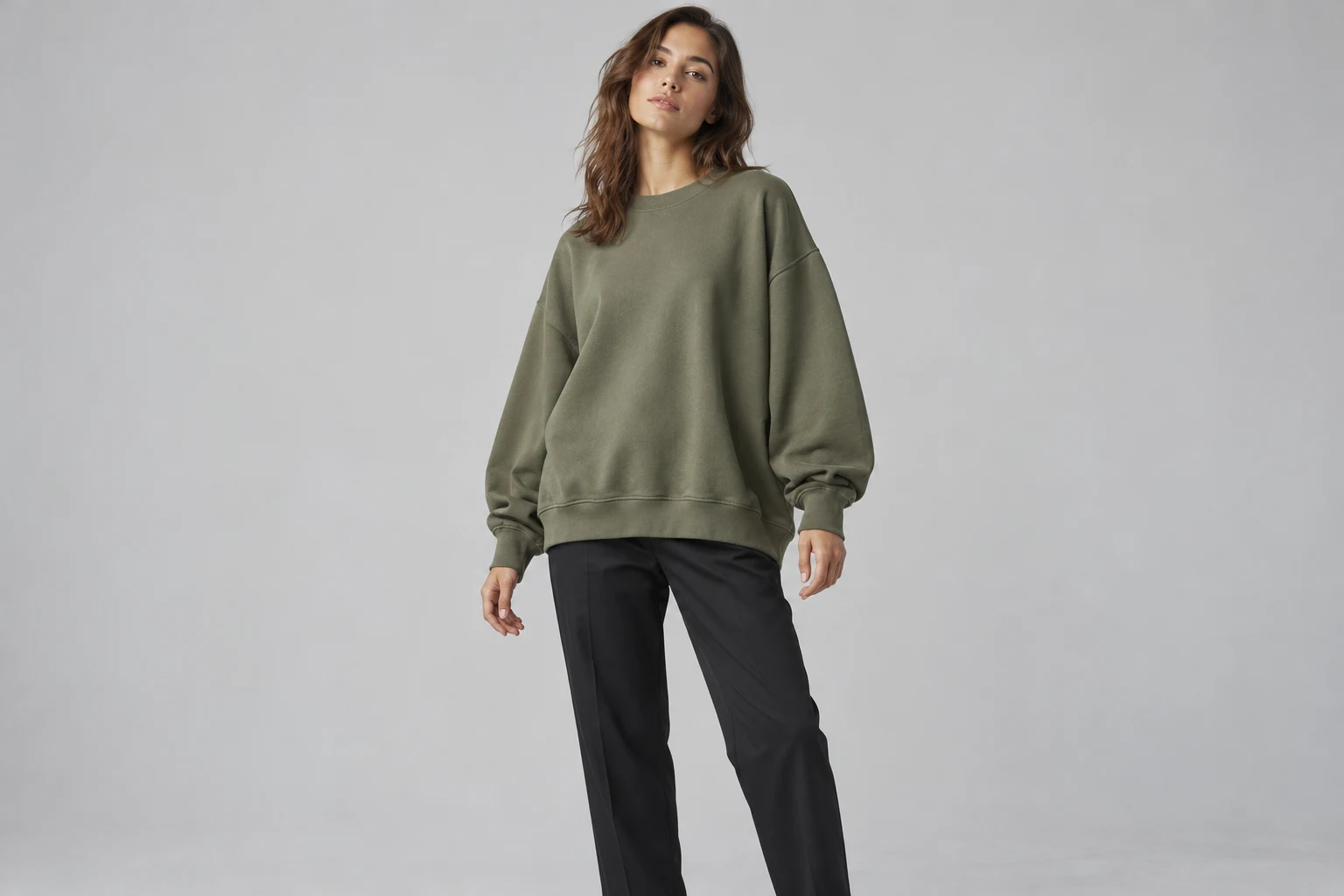
Show the garment’s intended shape without presenting the image as a sizing calculation.
An oversized sweatshirt should retain the product’s own design landmarks: a dropped shoulder if present, the intended sleeve shape, a roomy body, and the original hem treatment. Simply increasing every visible dimension can create a different garment. Start with references that show how this particular product is constructed and, when available, how it is actually worn.
The conceptual olive sweatshirt illustrates a style, not a measured fit result. A generated image can help communicate a creative presentation, but the visible folds do not establish chest circumference, sleeve measurements, or the correct size for a customer. Keep those product facts in the actual size information supplied by the brand.
Body vs Garment Measurements
The two describe different things, even when a chart uses familiar size labels.
Upper shape
Upper shape
Locate shoulder and sleeve volume.
Lower shape
Lower shape
Inspect body folds and hem treatment.
Patagonia explicitly distinguishes body measurements from garment dimensions in its sizing information. Tilly and the Buttons explains ease as the room between body and finished garment measurements, including additional fullness for design. These sources describe their own contexts; they do not provide a universal formula for how every oversized product should look.
For your brief, identify which information the brand actually supplies: the labeled size, finished garment measurements, model information, or a real wearing photograph. Do not infer missing measurements from a generated body or convert a visual impression into a recommendation. Keep the original labels attached to their correct data rather than blending them into one ambiguous fit claim.
Read the Construction Landmarks
Use shoulder, sleeve, body, and hem as separate questions.
- Shoulder
- Seam position in the reference.
- Sleeve
- Width, length, and cuff.
- Body
- Room and material behavior.
- Hem
- Loose, ribbed, or intentionally tucked.
Check where the shoulder seam sits in the real reference and how the sleeve falls from it. Then inspect the body width and the way the hem finishes. A wide torso with unexpectedly narrow sleeves may contradict the actual design. A dropped shoulder alone does not establish the entire oversized silhouette.
Choose landmarks the final composition can show. If a hand covers the cuff or the frame cuts off the hem, use another view for those checks. A full outfit can explain the styling while a simpler front image explains the sweatshirt. Keep both roles clear so a fashionable pose does not silently replace product evidence.
Distinguish Folds from Cut
On-body fabric will not reproduce a flat garment outline exactly.
Visible construction and volume
Pose and fabric folds
Two inspection crops from one conceptual photograph, not a before/after test.
A fold under the arm can shorten the visible section of a sleeve without changing the sleeve itself. A tucked hem can hide the original body length. Compare the wearing arrangement before deciding that the cut has changed. Use a view with arms relaxed and the relevant edges visible when your purpose is to inspect the design.
Do not make every discrepancy disappear under the word drape. An invented elastic hem, missing rib cuff, or altered neckline is still a product question. Check the original construction, then consider the pose. This keeps the discussion grounded in identifiable features instead of a general request to make the sweatshirt look bigger or more relaxed.
Prepare Volume References
Use actual wearing evidence when you have it, without inventing what is missing.
- Product source
- Explains construction.
- Real wearing view
- Shows the supplied styling evidence.
- Size information
- Records actual brand data.
- Creative image
- Presents the chosen direction.
Keep a clear product view for the cut and an actual on-body photograph if the brand has one for the same item. Label the product size and model information only when provided and relevant. Do not borrow a wearing photo from a similar sweatshirt and let it establish the fit of this one.
For the source kit, note whether the hem stays loose, gathers on a rib, or is intentionally tucked in the styled photograph. Those decisions change what the viewer sees. Keep the underlying garment reference available, so a later lookbook pose can be evaluated against the design rather than against an unrelated idea of oversized fashion.
Choose a Revealing Pose
A visible starting direction helps the team settle the presentation before inspecting the product.
Choose a model
When the selected scene needs one.
Add your product
Use the clear garment reference.
Choose a ready scene
Start with visible pose, light, and framing.
Generate and inspect
Review the product before approving.
In Studiola Lookbook, choose a model when needed, add the sweatshirt, and select a ready scene. The scene shows a pose, lighting, and framing direction, and the basic flow needs no written prompt. For a volume-led product, favor a pose that leaves the shoulder line, sleeve width, and hem available to inspect.
The workflow helps reduce setup decisions rather than predicting fit or guaranteeing drape. TRY ON is a lower-credit-cost alternative for more open creative exploration, where pose and scene decisions may take more iteration. Keep the product brief stable across attempts: use the supplied construction and wearing arrangement instead of asking for an unspecified larger size.
Keep Sizing Evidence Separate
Keep the visual promise within what the image and references can support.
Design
Shoulder, sleeves, body, and hem match the product.
Presentation
The wearing arrangement is intentional and recorded.
Sizing
Actual measurements stay separate from the generated view.
Approve the visible cut, wearing arrangement, and material character against the product source. Retain actual measurements and size guidance in the product information where shoppers expect them. The image can show a roomy creative presentation without claiming that the same shape will appear on every body or at every labeled size.
When a reviewer asks whether the sweatshirt is oversized enough, return to the landmarks: shoulder, sleeve, body, and hem. If the source does not explain one of them, add a reference. If the generated result changes it, revise the result. This gives the decision a product basis instead of making the size label do all the work.
Sources, method & questions
Published · By Studiola Editorial Team
Frequently asked questions
Does an oversized AI image establish the correct size?
No. Visual drape does not establish actual garment or body measurements. Use the brand’s real size information for sizing decisions.
Should I make a regular sweatshirt look larger?
Use the actual product construction. Arbitrarily adding width or length can turn the image into a different garment.
Is a flat lay enough to judge drape?
It can explain shape, but it does not show every on-body behavior. Keep actual wearing evidence for the same item when available.
How this guide was researched
Studiola editorial guide informed by the linked primary sources, accessed October 23, 2026. Practical reference and review recommendations are editorial guidance, not measured model performance. Photographs are AI-created illustrations; diagrams explain the process. No independent benchmark or accuracy guarantee is claimed.
Sources & further reading
- 01Men’s Tops and Jackets Sizing Information
Patagonia Australia · Primary source · Checked
- 02How to Select Your Sewing Pattern Size
Tilly and the Buttons · Primary source · Checked
Give the garment a clear starting point
Bring your own product to a ready Lookbook scene, then inspect the details before publishing.