Keep Every Clothing Layer Visible
An open jacket and a simple top can become a confusing single garment. Define the layer order, preserve each product, and inspect the boundaries that explain the outfit.
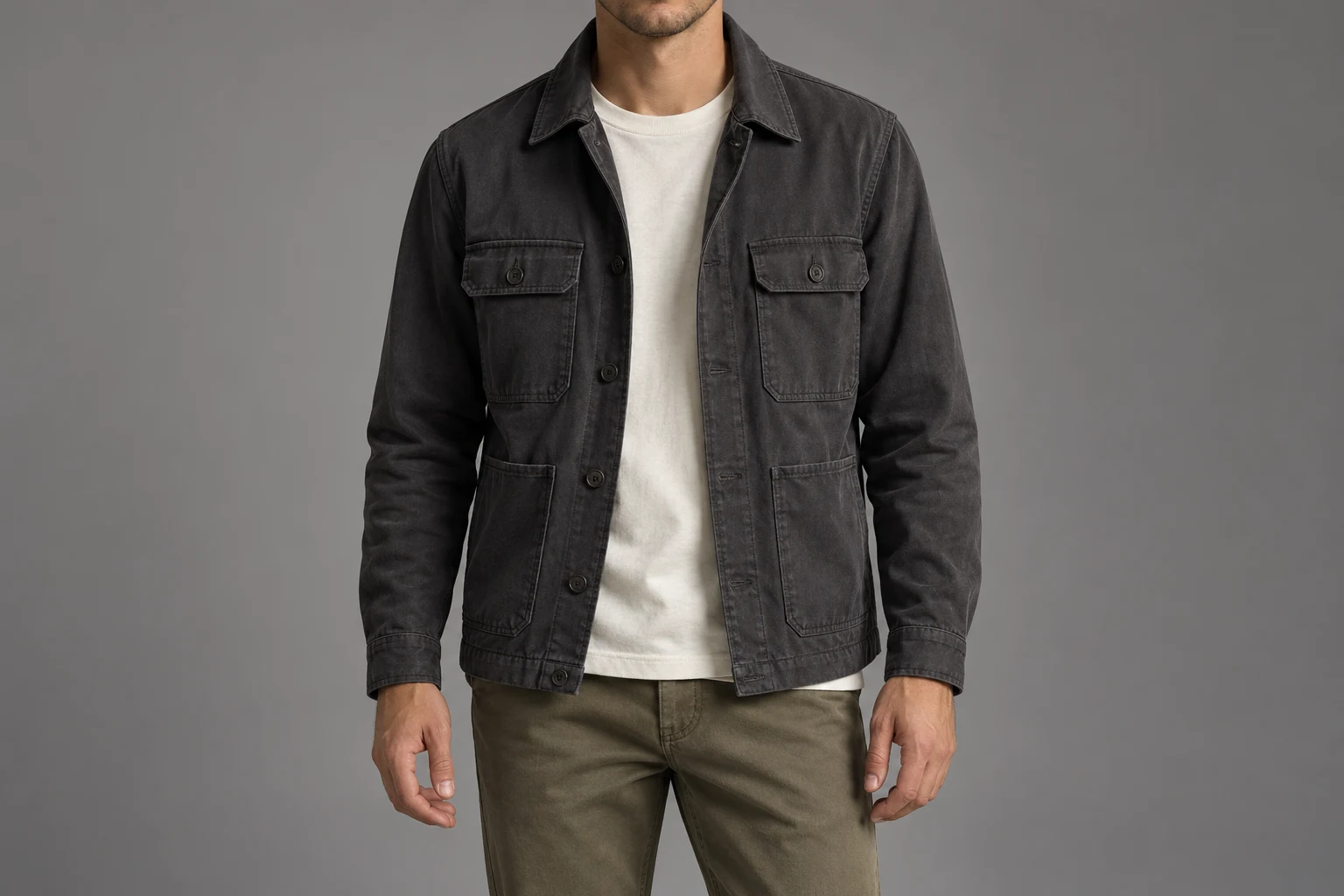
Each visible garment needs its own identity and a believable place in the stack.
For an open charcoal jacket over an ivory top, begin with two separate questions: what is the jacket, and what is the top? Then decide how they are worn together. The jacket opening should reveal the intended portion of the inner garment, while collar, cuffs, and hems should still describe the correct products where visible.
A convincing outfit can still merge the jacket placket into the top, invent a second collar, or turn the inner hem into jacket lining. Review the places where one layer meets another. Those small boundaries often explain the wearing arrangement more clearly than the overall pose, even when the scene and model look polished.
Give Each Layer a Role
Write the wearing arrangement in plain product language.
Neckline meeting
Neckline meeting
Identify the inner top and outer collar.
Hem meeting
Hem meeting
Keep the jacket and top edges separate.
State the outer layer, the inner layer, and whether the outer garment is open or closed. Note whether the top is loose or tucked. Do not rely on a general phrase such as casual layered look to settle those choices. The phrase describes a mood but leaves the visible construction of the outfit unresolved.
Shopify describes flat-lay, on-model, and lifestyle photography as different clothing presentations. Choose references that explain both the individual items and their intended arrangement. A flat jacket image can establish its construction; a real styled view of the same outfit can clarify overlap. Keep the roles separate rather than expecting one view to supply every detail.
Trace Inside to Outside
A simple layer map makes the intended relationships explicit.
- Inner
- The top and its neckline.
- Outer
- The jacket and its opening.
- Overlap
- Where one covers the other.
- Hem
- Which lower edges remain visible.
For this example, the crew-neck top lies beneath the open jacket. The top neckline appears inside the jacket opening, and any visible lower top hem remains a separate edge. Use the map to agree on the outfit before generation. If the jacket should be closed, build a different map instead of reusing an open-jacket brief.
The map is a planning aid, not a physical simulation. It tells the reviewer which item owns each visible edge. Keep optional accessories out of the first approval unless they are part of the brief. Adding a scarf or cross-body bag can hide exactly the neckline or opening that needs to be checked.
Inspect Where Layers Meet
Follow a boundary until it disappears naturally, not until it changes ownership.
Upper overlap inspection
Lower overlap inspection
Two inspection crops from one conceptual photograph, not a before/after test.
Start at the inner neckline and jacket collar. Then follow each side of the opening toward the hem. Look for a continuous garment edge, plausible overlap, and the supplied closure details where visible. An inner top should not become a new jacket panel because the two surfaces meet near the torso.
Natural overlap can hide a boundary. Do not treat every hidden section as a mistake or invent a visible seam to explain it. Instead, check the visible sections against the source and choose another view for a critical concealed feature. Keep the distinction between not visible and demonstrably changed in the review note.
Prepare Views and Wearing Notes
Make the reference set explain the layers without clutter.
- Closure
- Open or closed outer garment.
- Top
- Loose or tucked arrangement.
- Pose
- Important boundaries remain readable.
- Check
- Inspect each product and their overlap.
Keep a clear source for each actual garment and a short wearing note for the outfit. Include a detail when the jacket opening, collar attachment, or hem finish cannot be read in the general view. GS1 treats detail images as views of particular product features; use that idea to give each supporting image a specific purpose.
Adobe recommends planning required product angles before shooting. Apply the same discipline to the jacket and top: decide which boundary the final image must show, then choose a reference and pose that make it available. A large collection of unrelated styling pictures can introduce conflicting tuck, closure, or collar arrangements instead of clarifying the outfit.
Choose the Layered Scene
A ready scene should make the intended outfit easier to organize.
Choose a model
When the selected scene needs one.
Add your product
Use the clear garment reference.
Choose a ready scene
Start with visible pose, light, and framing.
Generate and inspect
Review the product before approving.
In Studiola Lookbook, choose a model when needed, add your own product, and select a ready scene. Pose, light, and framing are visible, and the basic flow needs no written prompt. For an open-jacket brief, choose a direction that keeps enough of the opening and hem visible to inspect the outfit against its references.
This helps reduce setup decisions, not guarantee correct layering. TRY ON is a lower-credit-cost alternative for more open-ended direction, which can require more pose and scene iterations. Keep the same wearing arrangement across attempts until you intentionally change it. Otherwise a new tuck or closure can make two results difficult to compare for the original task.
Approve Both Products
Check each garment once on its own, then check the relationship between them.
Products
Each visible item keeps its own construction.
Order
Outer and inner layers follow the brief.
Visibility
Critical boundaries can actually be inspected.
Compare the jacket’s collar, closure, pockets, sleeves, and hem where visible. Compare the inner top’s neckline, color, and visible length. Finally review the overlap: which edge is in front, which is behind, and whether the wearing arrangement matches the brief. This separates a product error from a deliberate styling decision.
When the scene hides a crucial boundary, use a clearer view rather than approving by inference. Name the revision precisely: inner neckline merged with the jacket collar, top hem missing, or jacket unintentionally closed. Keep the layer map and original product sources with the approved image so the next edit starts from the same outfit definition.
Sources, method & questions
Published · By Studiola Editorial Team
Frequently asked questions
Should every edge of both garments remain visible?
No. Natural overlap hides some edges. Important product features still need a clear view somewhere in the reference and delivery set.
How do I describe an open-jacket outfit?
Name the jacket as the outer layer, identify the inner top, and state the intended closure and tuck arrangement.
Is a missing boundary always a layering error?
Not if the pose naturally hides it. Separate hidden information from a visible change in construction, and use another view when needed.
How this guide was researched
Studiola editorial guide informed by the linked primary sources, accessed October 23, 2026. Practical reference and review recommendations are editorial guidance, not measured model performance. Photographs are AI-created illustrations; diagrams explain the process. No independent benchmark or accuracy guarantee is claimed.
Sources & further reading
- 01Clothing Photography: How To Photograph Clothes
Shopify · Primary source · Checked
- 02GS1 Product Image Specification Standard
GS1 · Primary source · Checked
- 03What is product photography and how do you do it?
Adobe · Primary source · Checked
Give the garment a clear starting point
Bring your own product to a ready Lookbook scene, then inspect the details before publishing.