Front and Back, One Garment
A plausible back view is not necessarily your product’s back. Organize the actual references, identify each side, and review the design across the set.
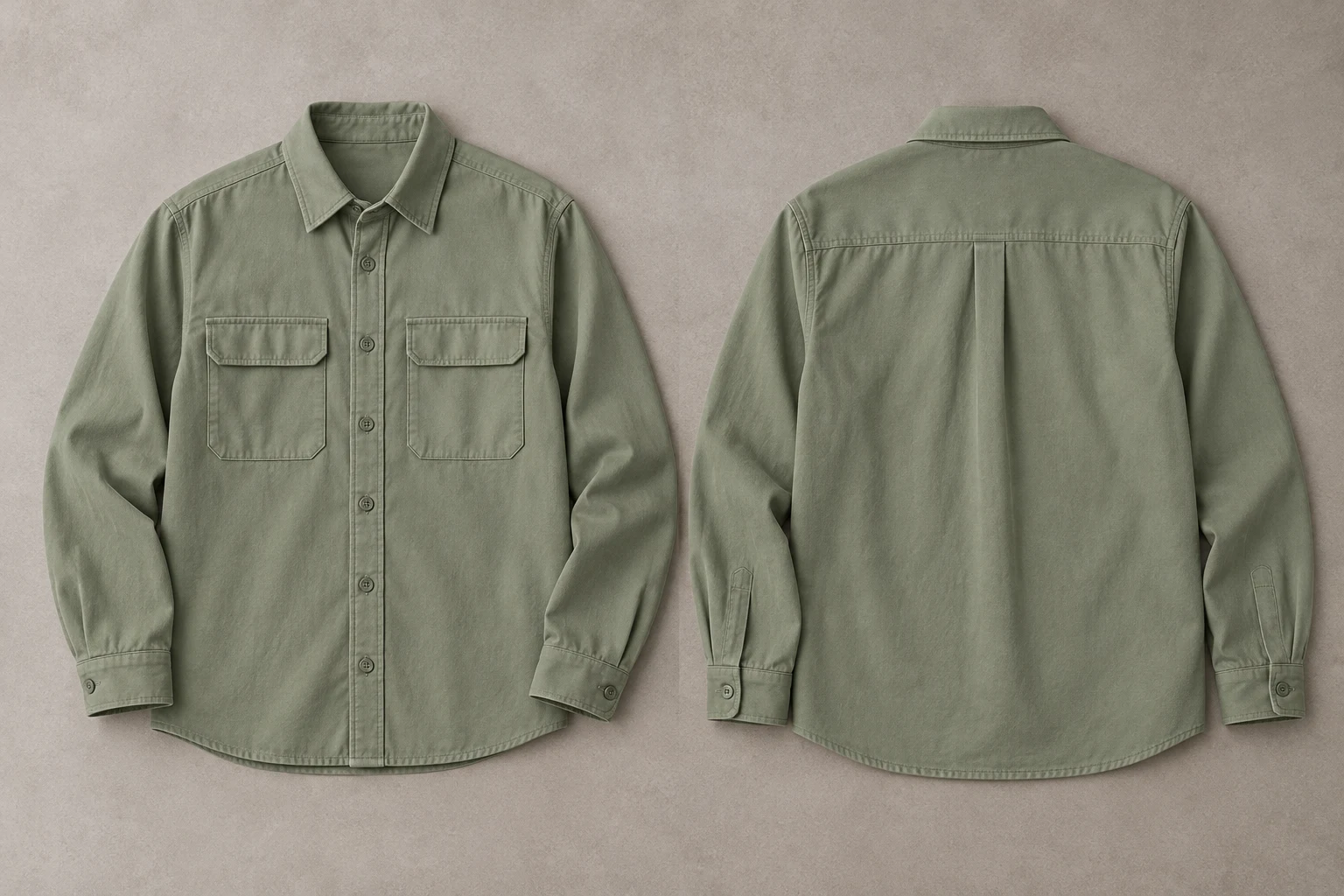
Give each view its own product evidence, then review them as one set.
Start with front and back photographs of the same item, colorway, and product revision. The front can establish a collar, placket, or chest pocket, but it cannot establish a rear yoke, back print, or vent that it does not show. A believable invented back is not a substitute for the actual design.
The conceptual sage overshirt provides a simple planning example: front pockets belong to the front, while a yoke and pleat explain the back. In a real job, use the manufacturer’s actual construction. Write down which features must appear in which view before creating a set, so the team is not judging each image in isolation.
Identify the Required Views
Consistent orientation is an organizational decision as well as a visual one.
Front information
Front information
Locate placket and visible front features.
Back information
Back information
Locate the rear construction reference.
GS1’s product-image standard identifies views in relation to a defined front face and distinguishes front, back, and other facings. Use that principle in your own library without adopting a complex naming system: decide what each photograph shows, label it clearly, and keep the same product identifier attached to every view.
Add wearer-relative left or right when a feature is asymmetric. A mirrored front photograph can look tidy while moving a pocket or graphic to the wrong side. Do not let a file called back determine the review by itself; inspect the visible construction and confirm that the label actually describes the image.
Map Each Side
Separate shared garment identity from view-specific features.
- Shared
- Colorway, material, sleeves, cut.
- Front
- Placket and front-only details.
- Back
- Yoke, pleat, print, or vent.
- Orientation
- Confirm side and mirror direction.
List the features shared across the set, such as colorway, collar, sleeve treatment, and overall cut. Then list what belongs to the front and what belongs to the back. For the example, the front map includes the placket and chest pockets; the back map includes the yoke and pleat. Your real map should follow your item.
The map is not a demand for matching pixels. Perspective, pose, and folds can change the visible outline. It is a way to spot an unexplained new pocket, missing rear feature, altered sleeve finish, or contradictory garment length. Keep each check tied to a source photograph rather than to a generic expectation of how an overshirt usually looks.
Show Unclear Rear Details
A general back view and a close-up solve different questions.
Front-side inspection area
Back-side inspection area
Two inspection crops from one conceptual photograph, not a before/after test.
If the yoke seam or pleat disappears in a distant photo, add a closer view that includes enough context to locate it. Show the full back print when one exists. A crop from the front cannot verify a feature that only occurs on the reverse, even when the fabric and color appear similar.
Shopify recommends multiple clothing angles and detail views to explain an item. Apply that approach selectively: add the view that resolves the missing information. Avoid filling the set with almost identical frontal photos while leaving the back unrecorded. The goal is a complete description of the important design, not a large number of interchangeable files.
Keep SKU and Revision Together
Reference organization prevents a similar item from becoming the accidental answer.
- Identify
- Same SKU and product revision.
- Capture
- Front, back, and useful details.
- Generate
- Use a direction suited to the angle.
- Compare
- Review the views together.
Use a simple manifest such as front, back, and rear-detail under the same SKU. Include the colorway and revision when your range needs them. Do not mix an early sample’s back with the production front. Check that a second colorway does not introduce a different pocket, trim, or print arrangement into the reference group.
Google Merchant Center supports additional product images for other angles. Use the same practical idea in the delivery set: the supplementary view should explain the same item as the primary image. Keep a clear source for each view so another teammate can understand why the collection was approved without reconstructing the decision from memory.
Choose the Required Angle
A common visual direction does not replace the missing view reference.
Choose a model
When the selected scene needs one.
Add your product
Use the clear garment reference.
Choose a ready scene
Start with visible pose, light, and framing.
Generate and inspect
Review the product before approving.
In Studiola Lookbook, choose a model when needed, add your own product, and select a ready scene suited to the required presentation. Its visible pose, light, and framing help settle the starting direction without a basic written prompt. For a back-view brief, make sure the intended composition actually makes the rear details inspectable.
The prepared direction helps reduce setup decisions; it does not guarantee matching front and back outputs. TRY ON is a lower-credit-cost alternative for more open exploration, where scene and pose choices may need more iteration. Review each candidate against its relevant source and then compare the whole set for shared product identity.
Approve the Complete Set
A beautiful front does not resolve a contradictory back.
Identity
All views belong to the same SKU and colorway.
Design
Shared and side-specific features follow their sources.
Coverage
The delivery set explains important unseen areas.
Lay out the candidate views together with their original references. Check shared colorway, sleeve treatment, collar, material character, and cut. Then inspect front-only and back-only features. Mark whether a difference is due to visible pose and fold, a hidden region, or an actual contradiction in the design. Those are different review decisions.
If the back reference is missing, capture it instead of approving an imagined construction. If the reference is clear but a candidate changes it, revise that view and check the set again during the normal editorial decision. Keep the design map and original photographs in the handoff so future crops and campaign versions remain tied to the same product.
Sources, method & questions
Published · By Studiola Editorial Team
Frequently asked questions
Can one front photo establish the exact back design?
No. If a back feature is absent from the reference, use an actual rear view or product detail instead of approving a plausible invention.
Must front and back outlines match pixel for pixel?
No. Pose, perspective, and folds change visible shape. Compare construction and shared product identity rather than identical pixels.
How should I name clothing reference files?
Keep a clear product identifier with front, back, and detail labels. Add colorway and revision when needed to prevent mixing similar items.
How this guide was researched
Studiola editorial guide informed by the linked primary sources, accessed October 23, 2026. Practical reference and review recommendations are editorial guidance, not measured model performance. Photographs are AI-created illustrations; diagrams explain the process. No independent benchmark or accuracy guarantee is claimed.
Sources & further reading
- 01GS1 Product Image Specification Standard
GS1 · Primary source · Checked
- 02Clothing Photography: How To Photograph Clothes
Shopify · Primary source · Checked
- 03Additional image link [additional_image_link]
Google Merchant Center · Primary source · Checked
Give the garment a clear starting point
Bring your own product to a ready Lookbook scene, then inspect the details before publishing.