Better Product References for AI Try-On
A practical reference kit for turning real clothing into a controlled AI fashion brief, from the first front view to the detail photograph that prevents guesswork.
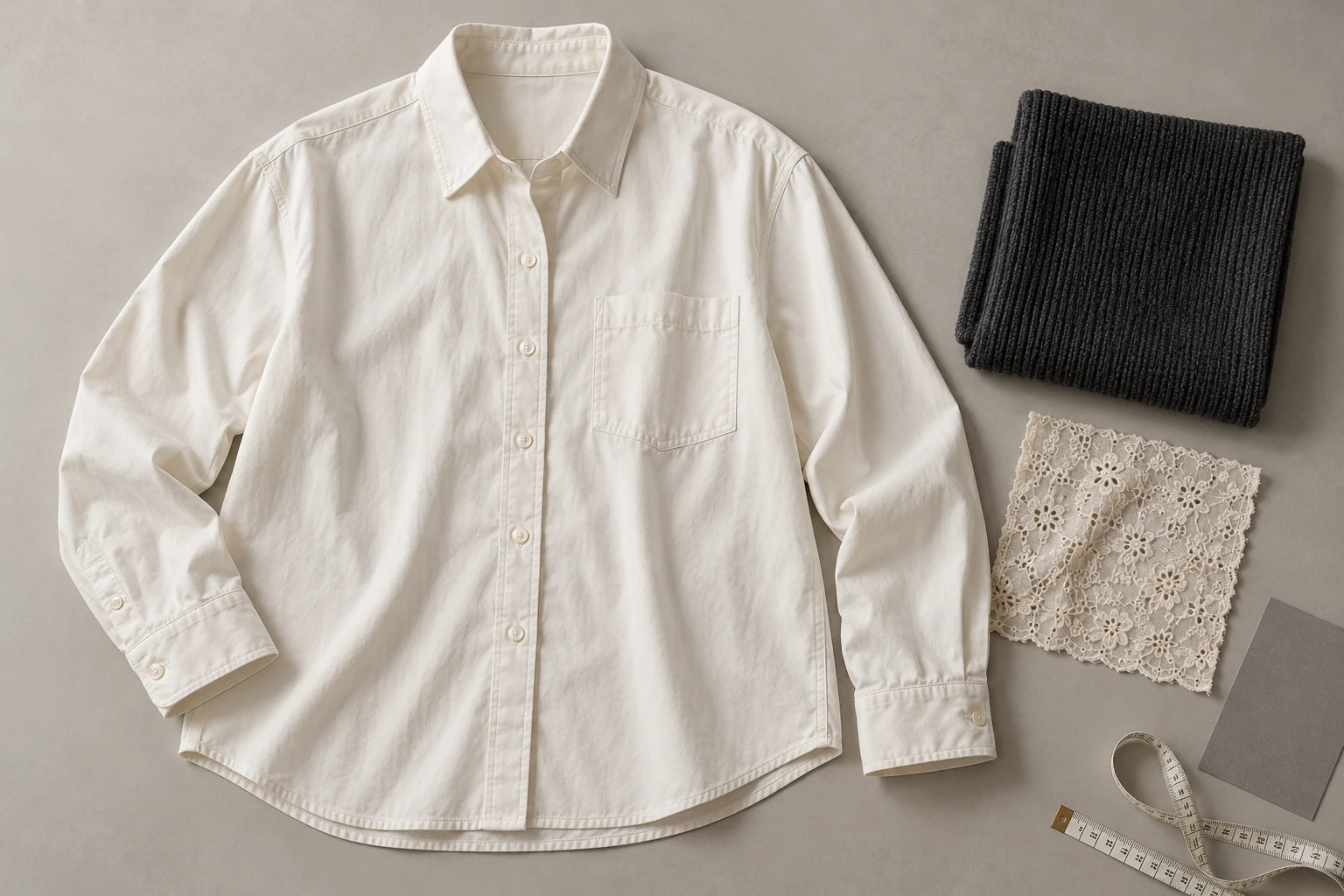
Choose the photograph that explains the garment clearly, rather than the one with the strongest mood.
The best starting photo shows the actual item, its full outline, and the details that distinguish it from a similar product. A clean front view often makes a useful first reference. Add another view when an important feature is hidden; a single photograph does not need to explain everything at once.
For an ivory overshirt, the useful information includes collar shape, button arrangement, chest pockets, sleeve length, cuffs, and hem. A dramatic campaign photograph may conceal several of these. Keep the campaign image as creative direction, and retain a straightforward product photograph as the source for garment identity.
Make the Outline Readable
Separate the product from its surroundings without erasing the construction.
Whole outline
Whole outline
See the collar, sleeves, and hem together.
Useful detail
Useful detail
Locate the feature, then inspect its construction.
Lay the overshirt with enough space around the sleeves and hem to see where the garment ends. Arrange the sleeves deliberately instead of hiding a cuff underneath the body. If the item is on a mannequin, make sure the support does not obscure the neckline or create the appearance of an extra panel.
Shopify distinguishes flat-lay, model or mannequin, and lifestyle photography. Treat those as different ways of showing the item, then select the one that carries the information your brief needs. An on-body photo can clarify wearing arrangement; a clean flat lay can clarify shape. Neither automatically supplies the missing information in the other.
Prepare the Garment First
Remove temporary distractions while keeping the product’s real character.
- Reveal
- Open the outline and selling details.
- Simplify
- Remove temporary obstructions.
- Capture
- Keep construction and fabric readable.
- Keep
- Retain the original product photograph.
Remove loose packing material, temporary clips, and a hanger that crosses a selling detail. Smooth accidental bunching so the garment can be read, but keep intentional pleats, gathering, and texture. The point is to reveal the item, not reshape it into a different cut. Photograph delicate construction as it actually exists.
Adobe’s product-photography guide recommends agreeing on required angles and visible labels before the shoot. Apply that planning step to the reference session: decide what needs to be seen, then capture it. A clearly photographed cuff is more useful than a large file in which the cuff remains folded out of sight.
Show the Small Details
A close-up should answer a question that the overall photograph cannot.
Overall product information
A closer inspection area
Two inspection crops from one conceptual photograph, not a before/after test.
Use a detail image for the overshirt’s fastening, the ribbing on a knit, or the border of an embroidered panel. Keep enough nearby context to locate the feature on the garment. An isolated patch of fabric can show texture but leave its placement unclear; combine the close-up with the full product view.
Check the photograph at the size you will actually review. If the important feature is unreadable, sharpening the preview does not establish the missing construction. Capture a clearer image instead. Avoid covering the detail with arrows or explanatory text in the source itself; keep those notes beside the reference, where they cannot be confused with the product.
Build a Focused Reference Kit
Use a front view, a useful detail, and another angle only when the design needs it.
- Front
- Shape and visible construction.
- Detail
- Small distinctive features.
- Back
- Information absent from the front.
- SKU note
- Colorway and product revision.
Keep a short reference list for each SKU: which view establishes the silhouette, which shows the distinctive feature, and which supplies information absent from the first two. Include a back view for a back yoke or rear print. Do not add several almost identical photographs merely to make the kit look more complete.
Google Merchant Center supports additional product images for other angles and staged views. Use the same organizational principle in your own library: label the job of each image. Keep the correct colorway and product revision together, so an old pocket layout or a similar neighboring SKU does not become an accidental reference.
Choose the Shoot Direction
Let the scene provide the creative starting point while the references establish the garment.
Choose a model
When the selected scene needs one.
Add your product
Use the clear garment reference.
Choose a ready scene
Start with visible pose, light, and framing.
Generate and inspect
Review the product before approving.
In Studiola Lookbook, choose a model when needed, add your own product, and select a ready scene. The scene gives the team a visible pose, light, and framing direction. The basic workflow needs no written prompt, which helps keep setup decisions separate from the task of checking whether the product is represented correctly.
Choose a scene that leaves the overshirt’s collar, opening, and hem visible. If the creative idea needs more open exploration, TRY ON is a lower-credit-cost alternative, although pose, scene, and wording may require more decisions. In either workflow, a prepared reference improves the brief; it does not guarantee an accurate output.
Set a Clear Review Rule
Specify what must remain recognizable and what the creative team may change.
Ready
The item and its important features are visible.
Add a view
A selling detail is hidden or unreadable.
Separate
Product facts and creative preferences are clearly recorded.
Write a short product note before production: two chest pockets, the original button arrangement, sleeves untucked, and the supplied ivory colorway. Keep it factual. Put scene preferences elsewhere. This makes the review easier to explain and helps another teammate distinguish an intentional styling choice from an unintended product change.
When a result fails, identify the missing evidence or the specific difference. Add a clearer reference if the source was ambiguous; revise the image if the source was clear. Keep original product photographs beside approved images in the handoff. The team should be able to trace an approved visual back to the item it represents.
Sources, method & questions
Published · By Studiola Editorial Team
Frequently asked questions
Is a flat lay always the best reference?
No. Use the view that explains the required product information. Add an on-body or detail view when it supplies something the flat lay cannot show.
Should I remove every wrinkle?
Remove accidental bunching that obscures the product, while retaining intentional structure and real fabric character.
Does a better source guarantee an accurate result?
No. It provides a clearer brief and a stronger basis for review; the generated garment still needs comparison with the original.
How this guide was researched
Studiola editorial guide informed by the linked primary sources, accessed October 23, 2026. Practical reference and review recommendations are editorial guidance, not measured model performance. Photographs are AI-created illustrations; diagrams explain the process. No independent benchmark or accuracy guarantee is claimed.
Sources & further reading
- 01Clothing Photography: How To Photograph Clothes
Shopify · Primary source · Checked
- 02What is product photography and how do you do it?
Adobe · Primary source · Checked
- 03Additional image link [additional_image_link]
Google Merchant Center · Primary source · Checked
Give the garment a clear starting point
Bring your own product to a ready Lookbook scene, then inspect the details before publishing.