Ghost Mannequin or AI Model?
An isolated garment and a styled person solve different catalogue problems. Start with what the product needs to explain.
A jacket and its interior reference
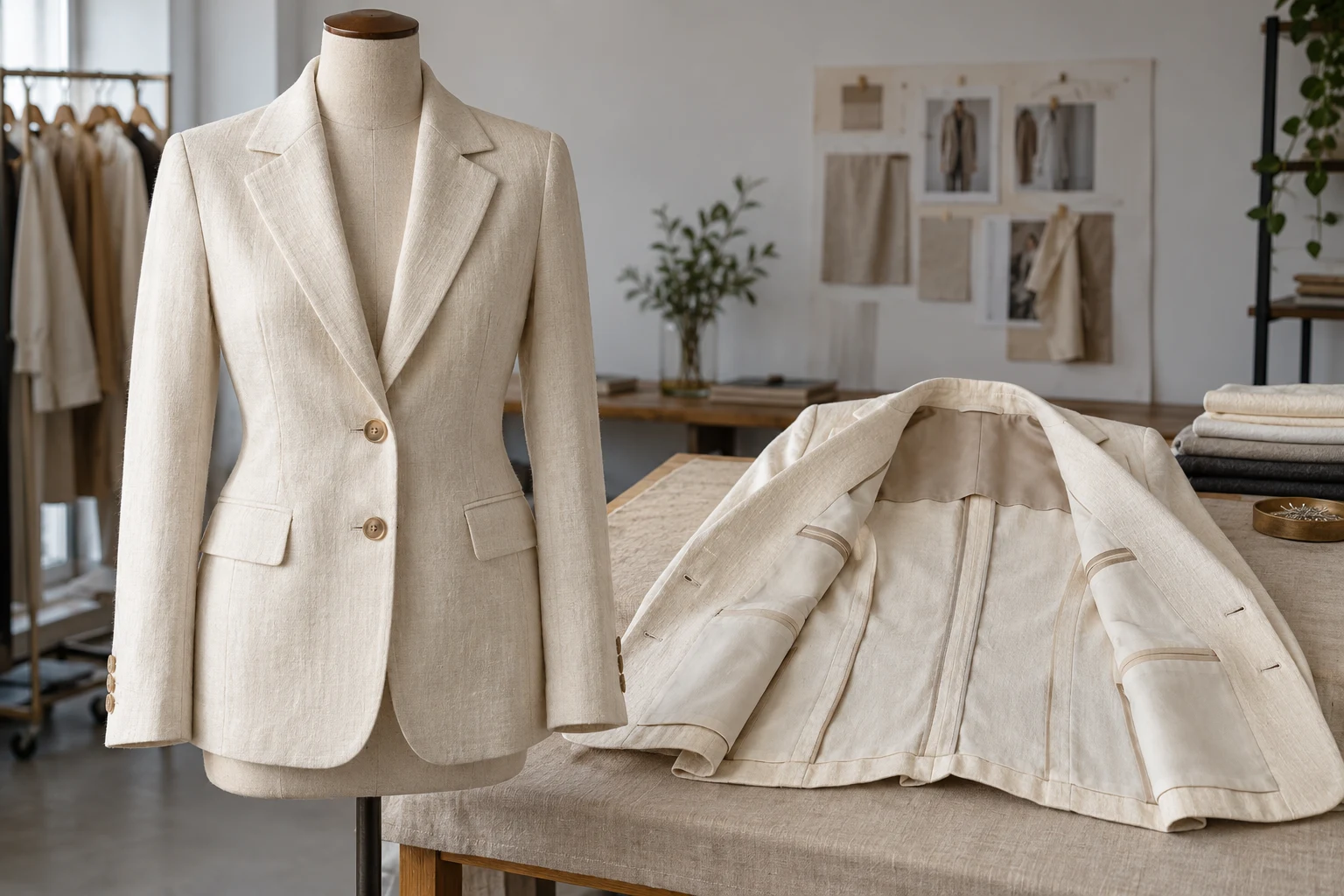
A ghost-mannequin photograph is usually intended to make the garment’s shape readable without a visible wearer. An AI on-model image adds a person, pose and styling context. Decide which job you need before choosing a workflow. A convincing person does not automatically explain a jacket’s interior or construction.
A product-photography discussion on Reddit asks how polished off-model garments were staged. Replies disagree about supports and editing methods, which illustrates a briefing gap rather than proving a technique. If a reference image shows depth and an open neckline, specify those visible requirements instead of requesting a vague premium catalogue look.
Choose the Useful View
- Ghost mannequin
- Isolated volume and construction
- On-model image
- Styling and body context
- Interior view
- Neckline, lining and hidden structure
- Physical evidence
- Real material and fit references
An isolated jacket can foreground lapels, closures and outline. A model view can explain intended layering and visual length relative to a person. A lining, inner label or unusual back panel may need its own photograph. Do not force one frame to perform every role simply because producing it was difficult.
Shopify’s clothing guide presents models, mannequins and flat lays as different approaches. Our recommendation is to preserve an accurate product record, then add the context that is missing. Keep any physical-fit claim tied to suitable real evidence. A generated styled image is not a measurement or proof of how a particular size will fit.
Capture Missing Product Information
Neckline
Neckline
Keep the inside edge and collar construction explicit when an open garment reveals them.
Closures
Closures
Record button count, fastening position and whether the garment is shown open or closed.
Back
Back
Retain a separate back source for vents, seams or details missing from the front.
Prepare a front, a back and an interior reference when those views contain materially different information. For tailoring, record the lapel shape, button arrangement, vent and lining. The goal is complementary information. Several nearly identical front photographs do little to explain a construction feature that none of them shows.
Keep the styling brief distinct from the product reference. A pose image can direct body position without authorizing a different jacket. An environment can set mood without changing fabric colour. When the product source is ambiguous, improve the source or use photography rather than treating an invented result as a recovered hidden view.
Use One Approved Product Record
- Capture
- Keep front, back and interior sources
- Separate
- Define product and styling roles
- Create
- Change context with a clear brief
- Review
- Check each view against the item
Create an internal brief with SKU, variant, product sources, intended wearing arrangement and required outputs. Decide whether the isolated image should show volume or a flatter silhouette. Then define the on-model frame separately: camera distance, pose, layering and how much of the item must remain visible.
Both outputs should point to the same product record. If the isolated view is closed and the model view is open, that may be intentional; if the pockets move or the lining changes, it is not. Write the allowed differences before reviewing. This prevents a visually attractive variation from being approved as a different product.
Separate Silhouette from Fit
Structure in context
A closer construction view
An empty garment and a garment worn by a person will naturally have different folds and outlines. Compare identity-bearing features rather than demanding identical fabric geometry. Lapels, pocket placement, closures and proportions should still agree with the source. Look closely at the transitions where sleeves meet the torso.
For the customer-facing gallery, provide additional views that answer a real question. Google Merchant Center describes additional images as useful for other angles and staged product views. That does not turn an imagined back or interior into evidence: use the appropriate actual source whenever the view makes a concrete construction claim.
Keep Creative Direction Together
Prepare
Collect the distinct garment sources and the correct variant.
Direct
Define isolated and styled views as separate deliverables.
Compare
Check construction, wearing arrangement and visible product identity.
Deliver
Label each approved role and preserve its source relationship.
A prepared garment kit can make the transition from a clean product presentation to a model scene less repetitive. In Studiola, organize the product, model and scene references before generating the styled direction. Name the intended output clearly so the review is about the requested view rather than an open-ended search for something appealing.
Reuse the approved visual direction across a related product family while checking each SKU individually. Structured context can reduce repeated selection and explanation, but the useful delivery count is still the number of accepted product images. Keep difficult construction cases separate from easy pieces when planning the work; they may need a different capture method.
Prepare the Team Handoff
Product
The selected SKU and variant match every approved view.
Structure
Collar, closure, pocket and back details retain their identity.
Purpose
Isolated volume and on-model styling have explicit roles.
Traceability
The delivery identifies sources and intentional differences.
Deliver the isolated and on-model files with role labels, SKU, variant and any intentional difference in styling. Include the source needed to inspect a disputed detail. This is more useful than sending a folder of unlabeled alternatives and expecting the merchandiser to decide which one represents the product.
Choose a physical capture when a generated view cannot reliably show the required interior, transparency or structure. That is a production decision, not a failure to write a longer prompt. The finished gallery should make the item easier to understand, with each frame adding information that survives the actual storefront crop.
Sources, method & questions
Published · By Studiola Editorial Team
Frequently asked questions
Should a brand replace all ghost mannequin images with AI models?
Only if the replacement still answers the relevant product questions. A model view may add styling while an isolated or interior photograph remains useful.
Can AI recover an unseen jacket lining?
It can generate an interpretation, but that does not establish the actual lining. Capture the real interior when it matters.
Do these examples demonstrate a specific tool’s accuracy?
No. The photographs are AI illustrations and the proposed workflow has not been presented as a benchmark.
How this guide was researched
Researched from the linked primary sources on October 23, 2026. Community posts identify questions, not representative findings. Recommendations are editorial workflows; images are AI illustrations and diagrams, not tested Studiola outputs.
Sources & further reading
- 01Clothing photography formats
Shopify · Primary source · Checked
- 02Additional product images
Google Merchant Center · Primary source · Checked
- 03How are these off-model garments styled?
Reddit · r/productphotography · Community question · Checked
Prepare the model view with a clear garment brief
Keep the product references together while exploring the person, environment and wearing arrangement.