Printed T-Shirts Need Clear References
Before reviewing the output, make the print easy to understand. A preparation guide for type, illustration, placement, and the difference between artwork and the manufactured shirt.
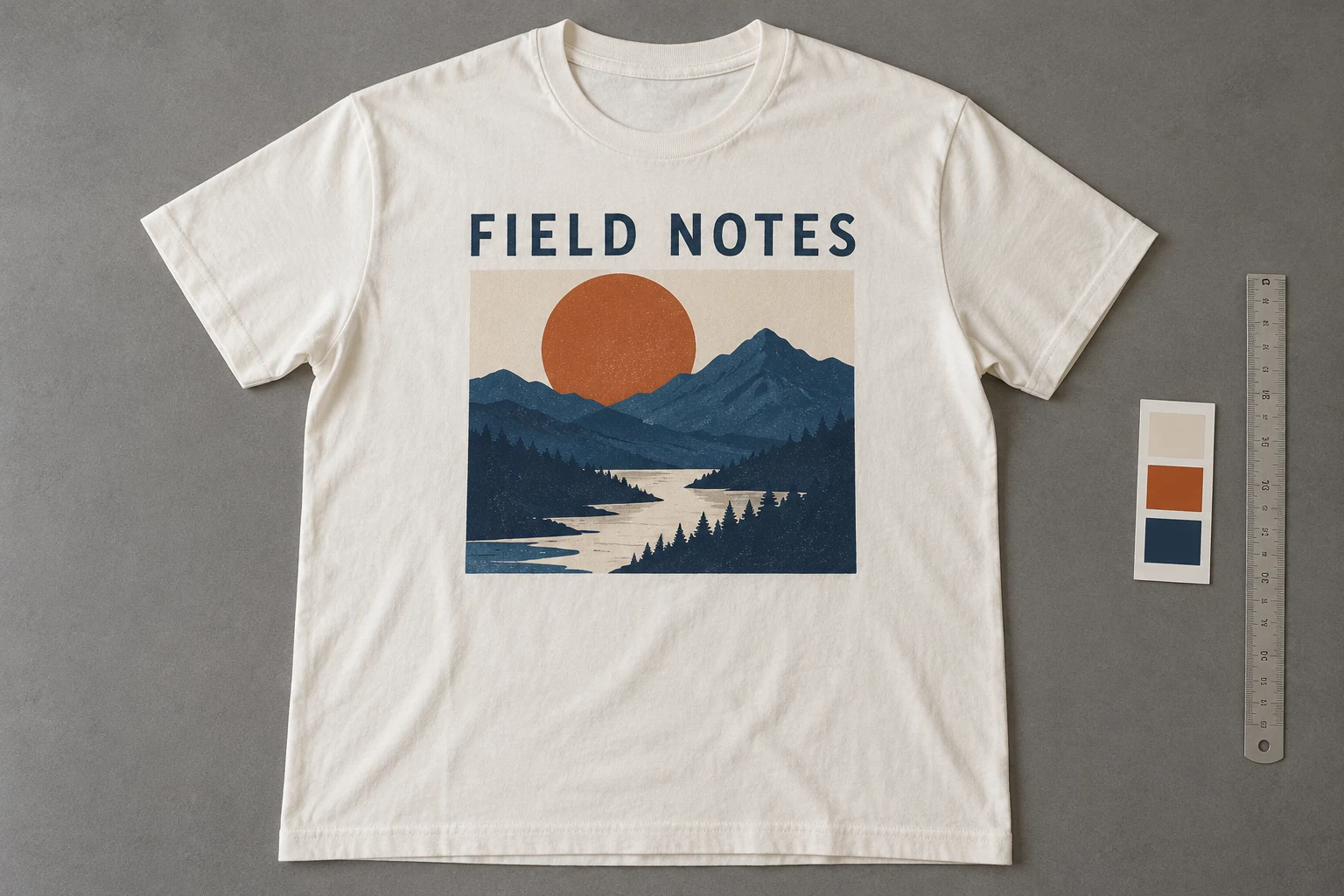
Show the print on the shirt, then provide the detail needed to read it.
For a printed T-shirt, begin with a clear photograph of the manufactured garment. Keep the full design visible: lettering, artwork boundaries, empty spaces, and the surrounding cloth. Add a closer image when the overall photograph cannot make small text or illustration detail readable. The reference kit should explain both the design and where it sits.
The conceptual shirt here uses a fictional landscape print. In a real job, identify the exact product revision before working on the scene. Two shirts can share the same blank and overall color while carrying different illustration versions. A good reference session prevents that version choice from being left to memory during later review.
Keep the Product Photograph
Artwork explains the graphic; the shirt explains the manufactured result.
Complete print
Complete print
Keep the whole design and nearby cloth visible.
Readable detail
Readable detail
Separate lettering and illustration questions.
An original artwork file can clarify a letter or an illustration shape, but it does not by itself establish the print’s physical position, scale, texture, or relationship to the neckline. Keep it as supporting information beside a photograph of the actual item. Do not treat a clean digital mockup as evidence of the manufactured garment.
Google Merchant Center requires an image of the actual product rather than a generic substitute. Carry that product-first approach into the reference plan. If the final shirt has a slightly different print placement or ink finish from the design mockup, the source set should make the real version clear before creative production starts.
Show Print and Detail
Each file should answer a different question.
- Whole
- Complete design on the shirt.
- Type
- Readable words and arrangement.
- Art
- Distinctive shapes and color areas.
- Surface
- Ink character on the fabric.
Use the whole-print view to record its arrangement on the garment. Keep the camera reasonably square to the print when the aim is to read its proportions. Use the detail view for small lettering, fine illustration lines, or ink texture. Include enough nearby artwork to locate the detail rather than supplying an unrecognizable fragment.
Adobe’s product-photography guide emphasizes planning required angles and visible labels. Apply that discipline here: decide which line of type or illustration feature must be legible, then capture it. Do not assume that a large image dimensions label means every printed feature is readable; inspect the feature itself in the original photograph.
Check Lettering and Artwork
Recognizing the general design does not establish all of its components.
Arrangement on the garment
Closer artwork inspection
Two inspection crops from one conceptual photograph, not a before/after test.
Read words in order instead of judging whether the text looks like a plausible slogan. Then look at the illustration: its composition, important shapes, line weight where visible, and color areas. Finally compare the negative space between the lettering and the image. These are separate checks, even when the whole print feels stylistically convincing.
Folds can curve a line of text or hide part of an illustration. Choose a clearer source for the hidden section rather than guessing its content. In the candidate image, distinguish a natural bend from a changed letter or an invented shape. If exact wording matters, keep a readable original detail in the published product set.
Record the Print Placement
Keep the print attached to neckline, seams, and hem.
- Identify
- Confirm SKU and print revision.
- Photograph
- Show the manufactured shirt.
- Support
- Add a detail or original artwork.
- Review
- Name the component that changed.
Check the relationship between the upper print edge and neckline, its position across the chest, and the space below it. A screenshot of the artwork alone cannot explain these relationships. Use the product’s own construction as the reference, rather than inventing a measurement from a perspective image or judging the design only against the image frame.
GS1 distinguishes detail images that show particular product features from general product views. Use that organizational idea in your reference library: a print detail should support, not replace, the view establishing placement. Name the files by SKU and revision so the front print, back print, and old artwork cannot be accidentally combined.
Keep the Print Visible
A coordinated direction works best when the selling feature is still visible.
Choose a model
When the selected scene needs one.
Add your product
Use the clear garment reference.
Choose a ready scene
Start with visible pose, light, and framing.
Generate and inspect
Review the product before approving.
In Studiola Lookbook, choose a model when needed, add the printed shirt, and select a ready scene. Its visible pose, lighting, and framing settle the starting direction without a written basic prompt. Prefer a scene where hands, outerwear, or deep folds do not hide the part of the print your team must inspect.
The ready direction helps reduce setup decisions, not guarantee exact typography or artwork. TRY ON is a lower-credit-cost alternative for a more open creative idea, with more pose and scene decisions potentially needed. Keep the same reference kit across either route. When revising, name the changed component: wording, illustration, placement, or print surface.
Hand Over the Print Decision
Make approval specific enough that another teammate can understand it.
Design
The visible words and artwork match the supplied revision.
Placement
The print sits correctly against garment landmarks.
Support
The original product view remains available.
Approve only the visible information that can actually be compared. Record whether the overall design, wording, placement, and relevant surface character match the source. If part of the print is intentionally hidden in a campaign frame, say so and retain an original product view that shows the complete design for anyone assessing the item.
When the reference is incomplete, add the missing view before requesting a reconstruction of the artwork. When it is complete but the output changes the design, revise or select another result. Keep the original shirt photograph and supporting artwork together in the handoff; neither a strong mood nor a crisp-looking new slogan should override them.
Sources, method & questions
Published · By Studiola Editorial Team
Frequently asked questions
Can I use only the original artwork file?
Use it as support. A photograph of the manufactured shirt is still needed to establish actual placement, scale relationships, and surface character.
Is readable generated lettering necessarily correct?
No. Read the actual wording and compare the letters with the source rather than accepting a plausible new slogan.
What if a hand covers part of the design?
Use another view for product approval and retain a complete original product image beside the creative frame.
How this guide was researched
Studiola editorial guide informed by the linked primary sources, accessed October 23, 2026. Practical reference and review recommendations are editorial guidance, not measured model performance. Photographs are AI-created illustrations; diagrams explain the process. No independent benchmark or accuracy guarantee is claimed.
Sources & further reading
- 01Image link [image_link]
Google Merchant Center · Primary source · Checked
- 02What is product photography and how do you do it?
Adobe · Primary source · Checked
- 03GS1 Product Image Specification Standard
GS1 · Primary source · Checked
Give the garment a clear starting point
Bring your own product to a ready Lookbook scene, then inspect the details before publishing.